Signup flow review
AI onboarding audit.
Test your signup flow.
Paste a signup URL. Impatient walks it as a first-time user. You get an onboarding UX audit: each screen, the five things to fix, and one change mocked up.

What the walk does
Impatient is the free persona. They skip the copy and quit on extra fields. The walk opens your URL in a browser, fills obvious test values, and stops after a handful of screens.
It stops on a card form, a captcha, or an email check, and it names that screen. It does not type a card. The account form stays unsubmitted unless you say you own the site and give a test email.
The other personas stay locked: Skeptical, Non-native English, Mobile thumb, First-timer, and the later set (older eyes, colour blindness, large text, other devices). This walk does not charge for them.
The signup prompt is the idea behind the walk. The new-user signup test is those steps written out, for when you walk it yourself. The onboarding checklist is the short list of what Impatient looks for. Narrower questions: should the form ask for the password twice, which fields to cut, what the first screen should say, and why the signup button stays disabled, where the password rules should sit, and asking for a work email, and a provider button above the email.
Walk your signupWhat a report contains
One new user. Impatient.
Where they stumbled
https://www.swiftqms.com/auth/register
Impatient didn't create an account. That stays off unless you own the site and give a test email.
Anyone with the link can read this walk. Screenshots stay in this tab.
The walk
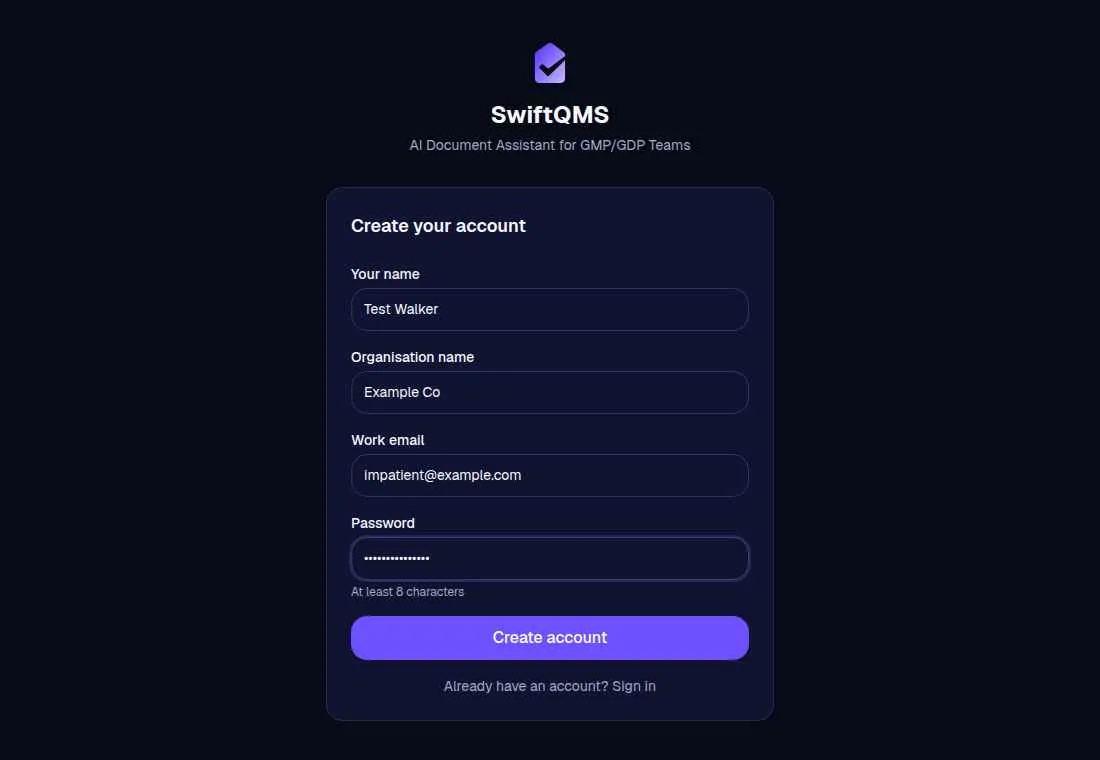
Step 1SwiftQMS
Headline “SwiftQMS.” Fields: Your name, Organisation name, Work email, Password. Buttons: Create account, Sign in. No price. No trust marks.
Did. Filled Your name, Organisation name, Work email, Password with test values. Didn't press Create account.
“Organisation name is above the email field, so I closed the tab.”
Things to fix
Ranked for Impatient. Each one points at the step behind it.
- 1
Ask for an email before organisation name, and leave organisation name until they're in the product.
“Organisation name is above the email field, so I closed the tab.”
Organisation name before the product
- 2
Add a show-password control on the “Password” field.
“The “Password” field is here, and nothing on the screen shows the password.”
No show-password on “Password”
- 3
Mark “Your name”, “Organisation name”, “Work email”, and “Password” as required before the first try.
“Your name”, “Organisation name”, “Work email”, and “Password” are required, and the form never says so.
“Your name”, “Organisation name”, “Work email”, and “Password” don't say they're required
One fix, mocked up
The top issue, from step 1. Organisation name before the product.
One change
SwiftQMS
Ask for an email before organisation name, and leave organisation name until they're in the product.
Your name
Work email
Password
Stopped on SwiftQMS: Organisation name before the product.
More personas
This walk was Impatient. The others are not built yet.