One field
Confirm password.
Should the form ask twice?
One password field, with the rules beside it and a way to show what was typed.
The short answer
Ask once. Stumblet treats confirm password, repeat password, and re-enter password as an extra field. A normal password field is not extra.
Walk your signup
What we saw on swiftqms.com
On 25 Oct 2026, at 15:39 GMT, Impatient walked swiftqms.com. Nothing was submitted. One screen: “SwiftQMS”. The notes say: Headline “SwiftQMS.” Fields: Your name, Organisation name, Work email, Password. Buttons: Create account, Sign in. No price. No trust marks. Filled Your name, Organisation name, Work email, Password with test values. Didn't press Create account.
The saved fields are Your name, Organisation name, Work email, Password. Confirm password, repeat password, and re-enter password are not in that list. The password rules saved on that step were “At least 8 characters”. Password rules were not one of the findings from this walk.
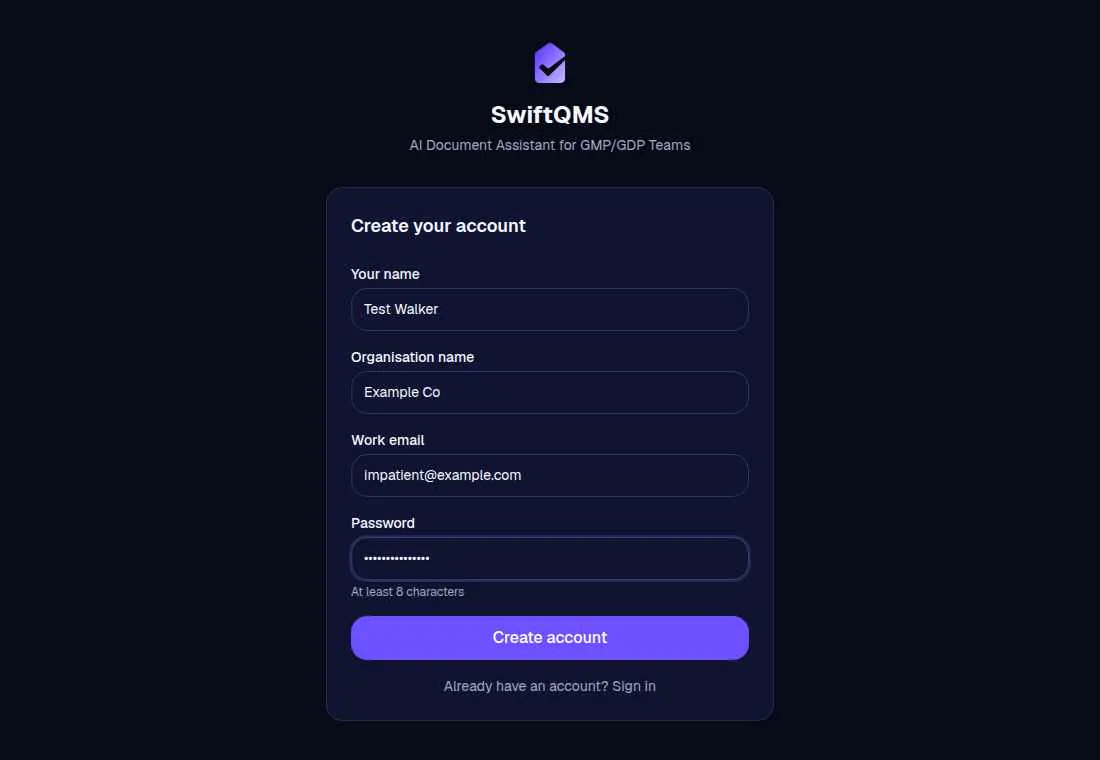
The same screen flagged No show-password on “Password”. The line: “The “Password” field is here, and nothing on the screen shows the password.” The change: “Add a show-password control on the “Password” field.” The required-field finding, “Your name”, “Organisation name”, “Work email”, and “Password” don't say they're required, is on the signup fields page.
What Stumblet flags
1Confirm Password before the product
A password field is part of the signup. A field labelled confirm password, repeat password, or re-enter password is an extra field. The title uses that label, so a field called Confirm Password becomes “Confirm Password before the product.” When the email field sits above a required confirm field, the fix is “Leave confirm password until they're in the product.” The line is “I had the email field, then it wanted confirm password, so I closed the tab.” When that field is not required and sits under the email, the line is “Confirm Password is on the form before I can see the product.” Re-enter password matches with or without the hyphen. A required extra field ranks higher than one that is not required.
2Password rules aren't beside the field
If a password field is on the page and the rules are not, the title is “Password rules aren't beside the field.” The fix is “Show the password rules beside the field before the first try.” The line is “The password field is here, and the rules aren't.” The page text counts when it states a length, uppercase, lowercase, a number, a special character, or “password must”. A checklist on the password field itself also counts, when the hint is at least two short chips such as “8+” and “Lowercase”. A hint on the confirm field does not count.
3No show-password on “Password”
If nothing on the screen shows the password, the title uses the field's label, as in No show-password on “Password”. The fix is “Add a show-password control on the “Password” field.” The line is “The “Password” field is here, and nothing on the screen shows the password.” A control called show password, hide password, reveal password, password visibility, show value, or hide value is enough. An icon-only button on the password field counts too.
Questions
Should a signup form ask for the password twice?
Stumblet treats confirm password, repeat password, and re-enter password as an extra field. When the email field sits above a required confirm field, the fix is “Leave confirm password until they're in the product.”
Where should the password rules sit?
Beside the password field, before the first try. If they are not on the page, the finding is “Password rules aren't beside the field.” A hint on the confirm field does not count.
Does a show-password control replace the second field?
They are separate findings. A missing show control is “No show-password on “Password”.” A confirm field is still “Confirm Password before the product.”
Which fields to cut, including display name, phone, company, the terms box, and a Step 3 of 5 counter, is on signup fields. What the first screen should say is on signup page copy. A button that stays disabled, and a password error that shows up only after typing, is on signup button. Showing the rules before anyone types, and naming the rule in a weak-password error, is on password rules. Asking for a work email is on work email. A provider button above the email is on social login. Running it yourself, and keeping the top five, is the new-user signup test. The short list is the onboarding checklist. The AI onboarding audit is the walk, and the signup prompt is the job it runs.
The walk is free. It starts on the home page.
Walk your signup