The first screen
Signup copy.
What the first screen says.
Say what the product is. Say what the button does. Name the account, if the way in is someone else's.
The short answer
The heading, or the line under it, should say what this product does. A first visit should not read as a return. The button should say what happens next.
Walk your signup
What we saw on swiftqms.com
On 25 Oct 2026, at 15:39 GMT, Impatient walked swiftqms.com. Nothing was submitted. One screen, and the form was on it. The screen was “SwiftQMS”. The notes say: Headline “SwiftQMS.” Fields: Your name, Organisation name, Work email, Password. Buttons: Create account, Sign in. No price. No trust marks. The step says “Filled Your name, Organisation name, Work email, Password with test values. Didn't press Create account.”
The page title was “SwiftQMS | AI Document Assistant for GMP/GDP Teams”. The submit button was “Create account”.
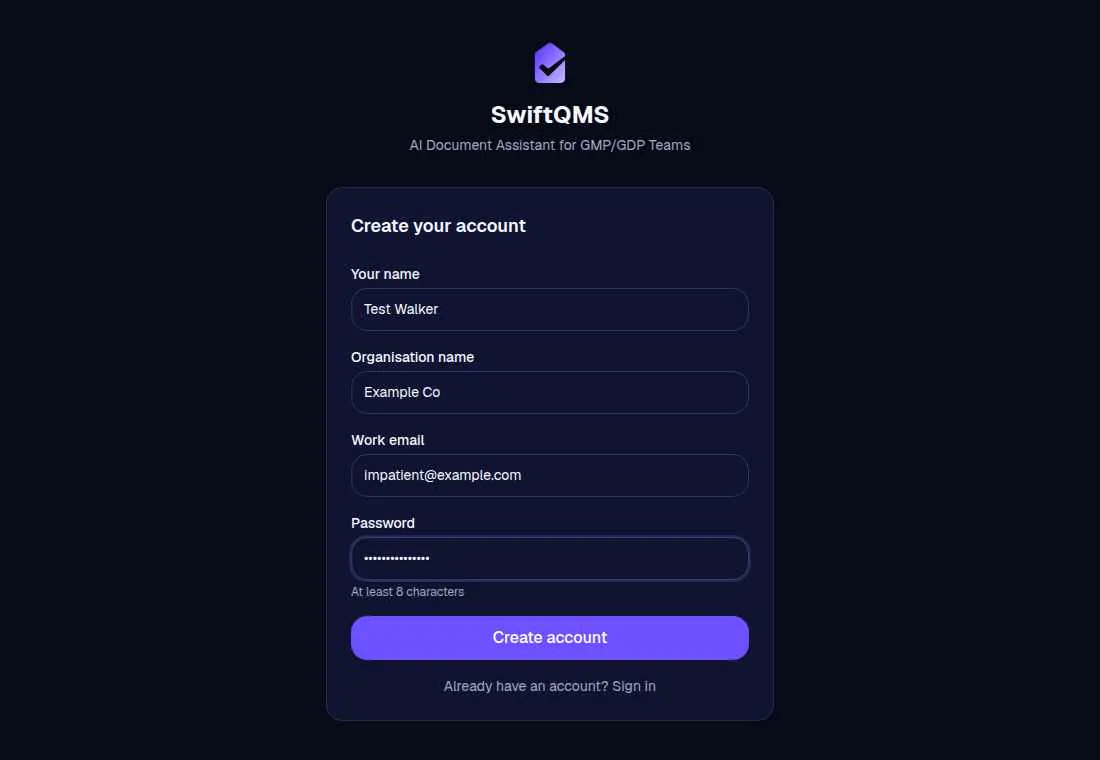
The walk saved these findings:
- Organisation name before the product
- No show-password on “Password”
- “Your name”, “Organisation name”, “Work email”, and “Password” don't say they're required
A vague heading, “Welcome back”, and a social login are not in that list.
What Stumblet flags
1“Sign up” doesn't say what this is
The heading is only a welcome, “Sign up”, “Sign up for” a short name, “Create your account”, “Create an account”, “Register”, “Get started”, “Enter your email”, “Enter your details”, or “Your … starts here”. Nothing else on the page says what the product does. The title is “Sign up” doesn't say what this is. The fix is “Say what the product is in the heading, or in a line under “Sign up”.” The line is “Sign up” doesn't say what this product is.
A second heading of twelve characters or more, that is not one of those generic lines, is enough. So is an intro line of at least twelve characters that says what the product does: six or more words, or four or more when it uses a plain verb the walker already looks for, including help, let, collect, manage, share, track, send, build, organise, analyse, and automate. A generic heading, a sign-in prompt, a terms line, or a trial or card line does not count. “Welcome back” and “Sign in” are the next finding, not this one.
2“Welcome back” for a first visit
Only the first screen of the walk. The title is “Welcome back” for a first visit. The fix is “Say “Welcome back” works for new accounts too.” The line is “This says “Welcome back”, and I'm here for the first time.” The same check matches a heading that starts with “Sign in”, “Log in”, or “Login”.
A signup heading wins, so “Create your account” with a “Sign in” link further down is not this finding. If the page has no heading, the document title is used, which is where a login page may put “Login”. If the walker can take a separate signup path, such as sign up, create account, register, get started, start free, or try free, the greeting is not flagged. Later screens are not checked. “Welcome to” the product is not a returning greeting.
3“Continue” doesn't say what happens next
The button that submits this screen is only Continue, Next, Submit, Go, Proceed, Ok, Okay, or Done. The title is “Continue” doesn't say what happens next. The fix is “Change “Continue” so it says what happens next.” The line is “Continue” doesn't say what happens after I press it. The walker uses that submit control. A social login button and a show-password control are not it.
4A social login above the email field
A social login or single sign-on button that comes before the email field. The title quotes the button, then “is above the email field”. The fix is “Put the email field above”, then the button's words. The line depends on what Impatient did. Opened the button: the button's words, then “comes before the email field, so I hit that first.” Filled the email: the button's words, then “comes before the email field, and I filled the email.” Otherwise: the button's words, then “comes before the email field.”
The button counts when the label is only a social login, single sign-on, or passkey name, or when that kind of name sits in a label that also says continue, sign, log, or with. A button below the email field is not this finding.
5A signup that only offers a third-party account
No email field, a social login or single sign-on button, and no other signup button such as sign up, create account, get started, start free, try free, continue with email, Continue, or Next. The title is the button's words, then “instead of an email field”. The fix is “Put an email field on this screen, next to the other way in.” The line is “The way in says” the button's words, “and I wanted an email field.”
This check uses a shorter set of names than the button above the email field. The label also has to say continue, sign, log, or with. A label that is only the account's name stays on the check above.
6The only way in is an account the screen never named
The walk leaves the product's domain for an account page on another site. Same-site sign-in stays in the walk. If the screen before the click did not name that account, and it had no email field and no other way in, the finding sits on that screen: a button that hands you to another site without saying which. The account name fills the gap in three lines. The title is “The only way in is a … account.” The fix is “Say that this needs a … account before the click.” The line is “Nothing here says I need a … account, and I may not have one.”
If the pasted link opens that account page directly, there is no previous screen. The title is “This opens a … account.” The fix is “Tell people this opens a … account before they arrive.” The line is “This opens a … account, and I may not have one.” If the button already names the account, there is no finding. The step itself says “Hands off to ….” and “This hands off to …, so I stopped.”
Questions
What should the first screen of a signup say?
What the product is, in the heading or in a line under it. A heading that is only “Sign up”, “Register”, “Get started”, or “Create your account” is flagged when nothing near it says more. The title looks like “Sign up” doesn't say what this is.
Why is Welcome back a problem on a new-user page?
On the first screen of the walk, “Welcome back”, “Sign in”, and “Log in” are the finding “Welcome back” for a first visit. The fix is “Say “Welcome back” works for new accounts too.” A later screen is not checked. A signup heading on that first screen, such as “Create your account”, is not this finding.
What should the button say?
More than Continue, Next, Submit, Go, Proceed, Ok, or Done. A button that is only one of those is the finding “Continue” doesn't say what happens next. The fix is “Change “Continue” so it says what happens next.”
What if the only way in is another account?
Name that account on the screen before the click. A social login or single sign-on button above the email field uses the button's words, then “is above the email field”. A signup that only offers a third-party account, with no email field and no other signup button, uses the button's words, then “instead of an email field”. A button that hands you to another site without saying which is “The only way in is a … account.”
The second password field is on confirm password. Which fields to cut, including the screens before the form, is on signup fields. A button that stays disabled, and an error that appears only after typing, is on signup button. Showing the password rules before that error is on password rules. Asking for a work email is on work email. A provider button above the email, a welcome-back heading, and a handoff are on social login. Running the signup yourself, and keeping the top five, is the new-user signup test. The short list is the onboarding checklist. The AI onboarding audit opens the URL, and the signup prompt is the job it runs.
The walk is free. It starts on the home page.
Walk your signup